
GraphPad R7 Configurable7.3.3 - App Store
You'll be able to see results in few seconds.
Publisher Description
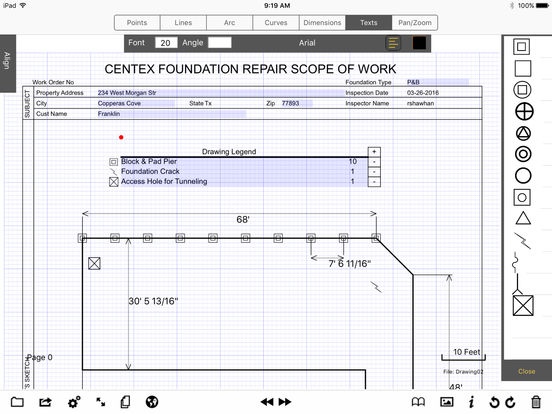
Configurable version of GraphPad Pro - Release 7.
GraphPad is a touch based dimensional drawing application integrated with simple multipage business forms. GraphPad enables your salesmen and inspectors to quickly create accurate 2D drawings as part of any proposal, estimate, or inspection form. Your salesmen no longer need to go back to their computer in order to draw up their design; they can do it right on the iPad while talking to the customer. Users can also add images to their drawings; crop, rotate and resize them right inside their document. Have a package created with all your standard business forms and symbols, then distribute it to all your iPads through a simple email attachment.
This release can only be accessed by purchasing a monthly auto-renewable subscription for $9.99 US. (See below for more details.)
List of features:
General Drawing features:
Sketch with automatic line straightening and angle snap
Creates continuous smooth curves
New line starting end point automatically snaps to the grid
Angle snap user settable (Off, 10,30,45 Degrees)
Units
Supports English inches, feet, yards and miles
Supports Metric millimeters, centimeters, meters and kilometers
Supports scale multiples of 1/100, 1/10, 1, 10, 100, 1000 of selected units
Scale slider allows easy scale from .5 - 10 times units
Dimensions
Create a dimension on an object with one touch
Supports line lengths, point to point, point to line and radius dimensions
Dimensions automatically adjust when the scale is changed
Objects of fixed dimensions automatically re-size when scale is changed
Calculations:
Calculate Areas of closed shapes
Calculate total line lengths of selected lines
Images:
Import images from the Photo Library
Import images from webpages, by copying them to the Photo Library
Rotate, scale and crop images
Set images to allow resizing, proportional resizing, or fixed size
Set images to allow or restrict rotation
Images rotate to the user specified angle snap
Display image dimensions for scaled images
Library:
CoreData backed Library system.
Can create new categories, and copy library entries between categories
Library entries properties are editable.
Store an image or geometry in the user library
Stored images retain image properties on size, dimensions and rotation
In addition to all the features above, this version of GraphPad can be configured with custom multipage forms as well as custom libraries of symbols. Custom configurations can not be created through the App itself, but can only be created through a consulting agreement. There is more information on custom configurations on my website:
www.GraphPadPro.com
GraphPad - Engineering drawing made easy!
Monthly Auto-Renewing Lease information
Access to GraphPad is managed by a Monthly Auto-Renewing lease.
- The Monthly lease price is $9.99 US.
- The lease price is subject to change, however, auto-renewal is automatically
turned off when there is an increase in price.
- Payment will be charged to iTunes Account at confirmation of purchase.
- This lease automatically renews unless auto-renew is turned off at least 24-
hours before the end of the current period.
- Account will be charged $9.99 US for renewal within 24-hours prior to the end
of the current period.
- Subscriptions may be managed by the user and auto-renewal may be turned off
by going to the user's Account Settings after purchase
- No cancellation of the current subscription is allowed during active subscription
period.
For information on our privacy policy please see the link:
http://www.graphpadpro.com/privacy-statement
For information on the terms of use please see the link below:
http://www.graphpadpro.com/terms-of-use
Requires iOS 9.0 or later. Compatible with iPad.
About GraphPad R7 Configurable
The company that develops GraphPad R7 Configurable is Robert Shawhan. The latest version released by its developer is 7.3.3.
To install GraphPad R7 Configurable on your iOS device, just click the green Continue To App button above to start the installation process. The app is listed on our website since 2016-09-06 and was downloaded 0 times. We have already checked if the download link is safe, however for your own protection we recommend that you scan the downloaded app with your antivirus. Your antivirus may detect the GraphPad R7 Configurable as malware if the download link is broken.
How to install GraphPad R7 Configurable on your iOS device:
- Click on the Continue To App button on our website. This will redirect you to the App Store.
- Once the GraphPad R7 Configurable is shown in the iTunes listing of your iOS device, you can start its download and installation. Tap on the GET button to the right of the app to start downloading it.
- If you are not logged-in the iOS appstore app, you'll be prompted for your your Apple ID and/or password.
- After GraphPad R7 Configurable is downloaded, you'll see an INSTALL button to the right. Tap on it to start the actual installation of the iOS app.
- Once installation is finished you can tap on the OPEN button to start it. Its icon will also be added to your device home screen.
Program Details
System requirements
Download information
Pricing
Version History
version 7.3.3
posted on 2016-09-06
Disclaimer
Official App Store Link
We do not host GraphPad R7 Configurable on our servers. We did not scan it for viruses, adware, spyware or other type of malware. This app is hosted by Apple and passed their terms and conditions to be listed there. We recommend caution when installing it.
The App Store link for GraphPad R7 Configurable is provided to you by apps112.com without any warranties, representations or guarantees of any kind, so access it at your own risk.
If you have questions regarding this particular app contact the publisher directly. For questions about the functionalities of apps112.com contact us.
